Cute Bunny: Add an Adorable Touch to Your Projects
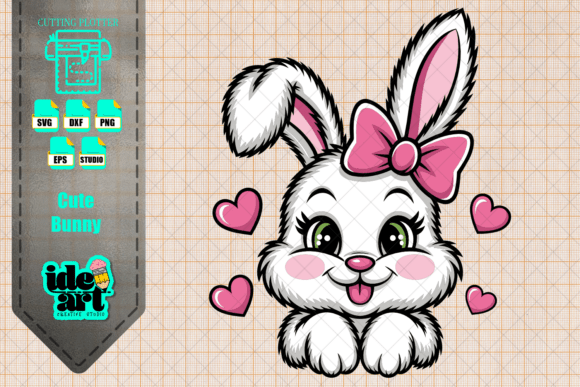
Bringing a sense of warmth and joy into creative work often starts with the right visual element. The Cute Bunny design is exactly that kind of element, offering a charming way to elevate everything from handmade cards to professional merchandise. This specific design features a delightful white bunny characterized by big, bright eyes, rosy cheeks, and a sweet pink bow, surrounded by floating hearts. It captures the essence of kawaii culture—soft, friendly, and instantly appealing. Whether you are a seasoned designer or someone just picking up a crafting tool for the first time, this character provides a versatile foundation for adding personality to your work.
Why This Design Stands Out in Creative Projects
The appeal of the Cute Bunny lies in its balance of simplicity and detail. Unlike complex illustrations that can be difficult to scale or reproduce, this design maintains clarity even when resized. The soft color palette, dominated by whites and pinks with subtle shading on the cheeks, ensures it blends well with various backgrounds without overwhelming them. For creators, this means less time tweaking colors and more time focusing on the final application.
One of the most significant advantages is the layered structure. The design is not just a flat image; it is constructed with distinct layers that allow for depth. This makes it ideal for projects requiring a three-dimensional feel, such as shadow box art or multi-layered vinyl decals. The inclusion of hearts around the bunny adds a dynamic element that suggests movement and affection, making it perfect for occasions centered on love and celebration.
Technical Versatility Across Formats
A major hurdle in digital crafting is finding files that work seamlessly with your specific software and hardware. The Cute Bunny package addresses this by providing a comprehensive suite of file formats designed for maximum compatibility.
- SVG (Scalable Vector Graphics): These files are essential for cutting machines. They ensure crisp edges whether you are cutting a tiny sticker or a large wall decal. The included layers allow you to separate elements, like the bow or the hearts, for intricate designs.
- PNG (High Resolution): With dimensions of 4000x4000 pixels and a transparent background, these images are ready for high-quality printing. They are perfect for digital mockups, social media graphics, or direct-to-film (DTF) transfers where pixelation is unacceptable.
- DXF: Specifically optimized for Silhouette Studio, these files integrate directly into the workflow of users with Silhouette Cameo or Portrait machines, eliminating the need for conversion.
- EPS: For professionals using Adobe Illustrator or CorelDRAW, the EPS format offers full vector editing capabilities, allowing you to adjust paths or colors while maintaining quality.
Practical Applications for Makers and Businesses
The utility of this design extends far beyond simple decoration. It serves as a functional asset for various techniques and industries. Understanding how to leverage the Cute Bunny can open new revenue streams for small business owners or simply make personal gifts more memorable.
Textile and Apparel Customization
For those interested in clothing customization, this design is a standout choice. Using DTF (Direct-to-Film) printing, the high-resolution PNG allows for vibrant transfers onto t-shirts, hoodies, and tote bags. The soft details of the bunny's fur and the sheen of the bow translate beautifully through modern printing technologies. Alternatively, crafters can use heat-transfer vinyl (HTV). Because the design includes separated layers, you can create a dimensional look by layering different colored vinyls—for instance, placing the pink bow slightly offset from the body to create a pop-out effect.
Sublimation and Hard Goods
Sublimation printing transforms plain items into personalized treasures. The Cute Bunny works exceptionally well on mugs, phone cases, mouse pads, and ceramic tiles. Since the background is transparent, the design adheres cleanly to the product surface without unsightly white boxes. This is particularly valuable for entrepreneurs selling at craft fairs or online marketplaces, as the clean presentation increases perceived value.
Paper Crafts and Stationery
In the realm of paper crafts, the precision of the SVG and DXF files shines. Scrapbookers can cut out the bunny and the surrounding hearts to create focal points in their layouts. Card makers can use the layered approach to build pop-up mechanisms or textured toppers. The delicate lines of the illustration hold up well during die-cutting processes, ensuring that the "rosy cheeks" and "big bright eyes" remain sharp and recognizable.
Ideal Occasions and Themes
While the Cute Bunny is timeless, it resonates particularly strongly with specific events and themes. Its gentle aesthetic makes it a natural fit for celebrations that require a tender touch.
- Easter Celebrations: As a seasonal icon, this bunny is perfect for spring decorations, Easter egg hunts, and themed party favors.
- Baby Showers and Birthdays: The soft colors and innocent expression make it suitable for nursery decor, baby onesies, and birthday invitations for young children.
- Children's Rooms: Parents and educators can use this design for wall decals, educational flashcards, or decorative pillows to create a comforting environment.
- Valentine's Day: With the hearts incorporated into the design, it doubles as a romantic motif for couples or friends exchanging gifts.
Key Considerations Before You Start
Before integrating the Cute Bunny into your next project, there are a few practical factors to consider to ensure the best results.
Material Compatibility: While the design is versatile, the outcome depends heavily on the material chosen. For example, when cutting adhesive vinyl, ensure the surface is smooth enough to hold the fine details of the bow and eyes. For sublimation, remember that the process requires light-colored substrates; dark fabrics will mute the white and pink tones unless a white underbase is used.
Software Proficiency: Although the files are described as "ready to use," having basic familiarity with your design software helps. If you are using Silhouette Studio, knowing how to ungroup layers will unlock the full potential of the 3D effects. If you are a beginner, start with the single-layer PNG for printing before attempting complex multi-layer cuts.
Licensing and Usage: Always verify the licensing terms associated with the digital download. Most commercial licenses allow you to sell physical products made with the design, but restrictions may apply to reselling the digital file itself or creating print-on-demand listings without modification. Ensuring compliance protects your business and respects the creator's work.
Final Thoughts on Adding Charm to Your Work
The Cute Bunny is more than just a graphic; it is a tool for storytelling and emotional connection. In a world saturated with digital content, tangible, handcrafted items featuring such endearing characters stand out. Whether you are producing a batch of custom mugs for a local shop or crafting a heartfelt card for a friend, this design offers the perfect blend of technical reliability and artistic charm. By utilizing the provided formats and understanding the best practices for each medium, you can bring this adorable character to life in ways that delight and inspire.